Nashville, TN
core service · nashville

Software Support and Maintenance for the Systems Your Team Depends On

Software needs care after launch: updates, monitoring, fixes and small improvements. Nashline Software looks after the systems Middle Tennessee teams depend on, including software another company wrote.

3 min read · 3 sections · 3 answers

Fewer surprises

Monitoring and alerts.

Secure

Regular updates.

Better over time

Planned improvements.

Documented

Always current.

You get named owners, regular reviews and documentation that stays current.

01

Monitoring and updates

Systems are monitored, patched and backed up on a schedule, with alerts reaching a named owner.

  • Uptime and error monitoring
  • Security updates
  • Backups and restore tests
  • Access reviews
02

Planned improvements

Feedback and usage guide a short list of improvements reviewed with you each month.

// how support & maintenance flows
  1. 1 Monitor
  2. 2 Spot an issue
  3. 3 Fix and test
  4. 4 Release
  5. 5 Report back
03

Systems built by others

We can take over software another team wrote, starting with a review and documentation.

TodayWith support & maintenance

✕Nobody watching the system

✓Monitoring with owners

✕Updates skipped

✓Scheduled patches

✕Documentation out of date

✓Kept current

The system handles

  • Uptime and error alerts
  • Backups
  • Dependency checks

Your people decide

  • Prioritising improvements
  • Planning bigger changes
  • Reviewing reports
your first release

What a first support & maintenance release includes

A focused starting point, shaped with your team in Discovery and adjusted to how your Nashville team works. Then we build on it.

  1. Discover
  2. Design
  3. Build
  4. Launch
  5. Optimize
Plan your first release →
release planSupport & Maintenance · v1.0Ready to scope
  • Monitoring setup01
  • Update schedule02
  • Backup and restore tests03
  • Monthly review04
  • Documentation05
  • Handover runbook and owner register06
Then: connect more tools, add automation and AI as your team is ready.
in practice

What support & maintenance looks like day to day

Illustrative scenarios, not client stories.

A clinic with a custom portal

Picture a portal nobody has updated in two years. Support adds monitoring, security updates and access reviews.

Build something like this →Every system is shaped around your own process.
faq

Support & Maintenance: questions we hear

Still unsure? Ask us directly.

Do you support software you did not build?

Yes, after a review.

Is it HIPAA compliant?

Yes. Our healthcare systems are fully HIPAA compliant, with encryption, multi-factor sign-in, role-based access, audit trails, a HIPAA-trained team member and a signed BAA.

Who owns the software?

You do. The code, the data and the documentation are yours after launch.

often built together

Support & Maintenance works best connected

Most teams start with one system and connect the next when they are ready. These are the services most often built alongside support & maintenance, on the same record.

All services →
built by our team

See the pattern in a real system

A sales platform covering recruiting, training, the rep workspace and contracts, where signed and paid triggers delivery and commissions.

All highlighted work →
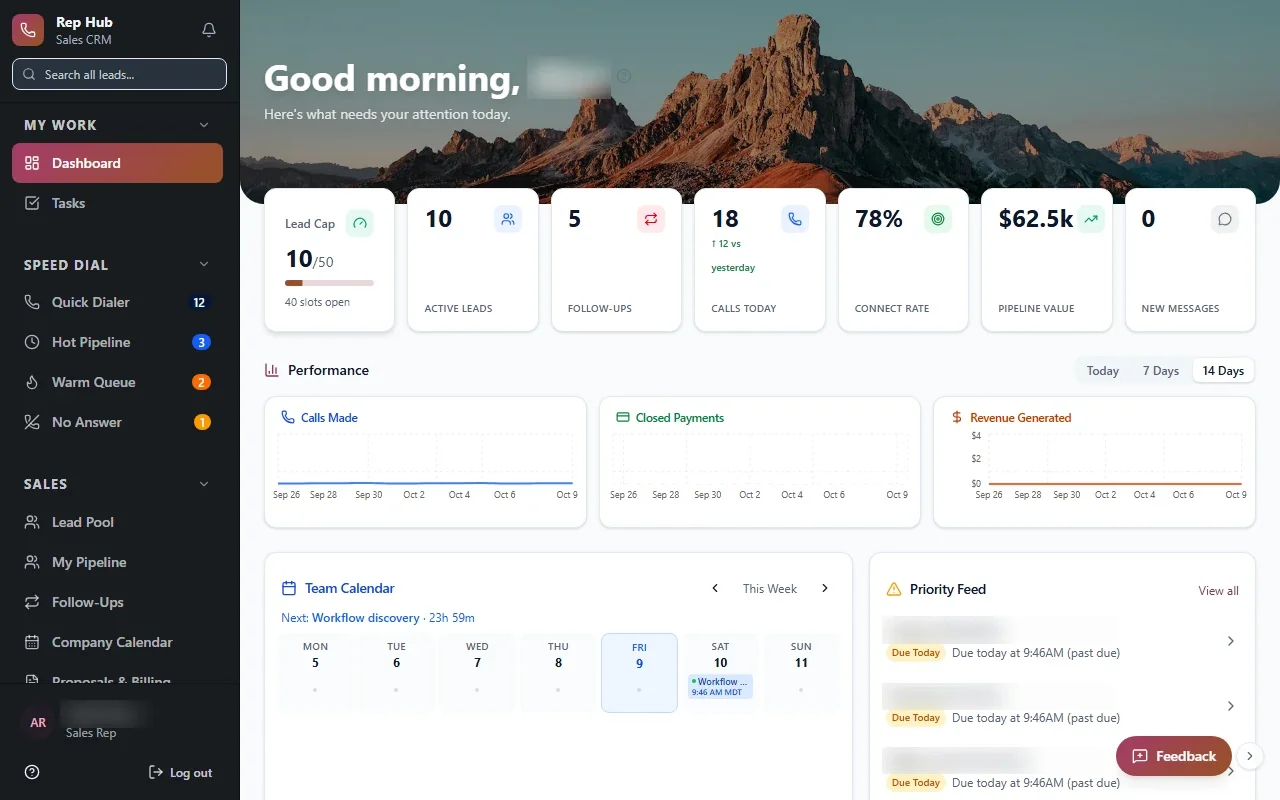
Rep HubRep Hub sales dashboard with lead pipeline, team performance, calendar and tasks Built · Sales organizationRep HubFrom joining the sales team to delivering the sale, in one connected platform.View the project →

Start with the problem. We'll build the possibility.

Tell us what slows your team down. We'll map it with you and suggest a useful first release, whether you're in Nashville or anywhere in Middle Tennessee.