Nashville, TN
manufacturing software · nashville

Maintenance and Asset Software That Keeps Machines Running and History in One Place

Maintenance teams in Middle Tennessee plants often keep preventive schedules on a spreadsheet and repair history in a technician's memory. Nashline Software builds maintenance and asset software with preventive schedules, work orders requested from the floor, parts tracking and a downtime history for every machine.

3 min read · 3 sections · 3 answers

Less downtime

Preventive work done on time.

Faster repairs

Requests with photos.

Better spending

Cost per asset.

Real history

Every repair logged.

Technicians use it on a phone at the machine, so records are written when the work is done.

01

Preventive maintenance on schedule

Each asset has its preventive tasks by calendar, hours or cycles. Work orders open on time and overdue tasks rise to the top.

  • Assets and locations
  • Calendar and meter-based tasks
  • Checklists and photos
  • Parts used and labor
02

Requests from the floor

Operators report a problem with a QR code on the machine. The request reaches maintenance with the asset, photos and the production impact.

// how maintenance & asset software flows
  1. 1 Service due
  2. 2 Work order created
  3. 3 Technician assigned
  4. 4 Work completed
  5. 5 History updated
03

History that guides decisions

Downtime, repairs and parts per asset show which machines cost the most to keep running and where to invest.

TodayWith maintenance & asset software

✕PM schedules on a spreadsheet

✓Work orders open on time

✕Requests shouted across the floor

✓QR requests with photos

✕History in someone's memory

✓Asset history on record

The system handles

  • Creating preventive work orders
  • Alerting maintenance to breakdowns
  • Tracking parts used

Your people decide

  • Repair decisions
  • Scheduling downtime
  • Replacing equipment
your first release

What a first maintenance & asset software release includes

A focused starting point, shaped with your team in Discovery and adjusted to how your Nashville team works. Then we build on it.

  1. Discover
  2. Design
  3. Build
  4. Launch
  5. Optimize
Plan your first release →
release planMaintenance & Asset Software · v1.0Ready to scope
  • Asset register01
  • Preventive schedules02
  • Mobile work orders03
  • Parts tracking04
  • Maintenance dashboard05
  • Handover runbook and owner register06
Then: connect more tools, add automation and AI as your team is ready.
in practice

What maintenance & asset software looks like day to day

Illustrative scenarios, not client stories.

A plant in Smyrna

Picture a press that breaks down every few weeks with no record of past repairs. The asset history now shows each failure, part and technician.

Build something like this →Every system is shaped around your own process.
faq

Maintenance & Asset Software: questions we hear

Still unsure? Ask us directly.

Does it work offline?

Checklists can be filled in where signal is weak and sync when the device reconnects.

Do we have to replace the software we use now?

Usually not. We connect the tools you keep where their APIs or exports allow, and build only what is missing.

Who owns the software?

You do. The code, the data and the documentation are yours after launch.

built by our team

See the pattern in a real system

A quote-to-service operating system where every job follows one path, and leaders only step in when a job drifts off course.

All highlighted work →
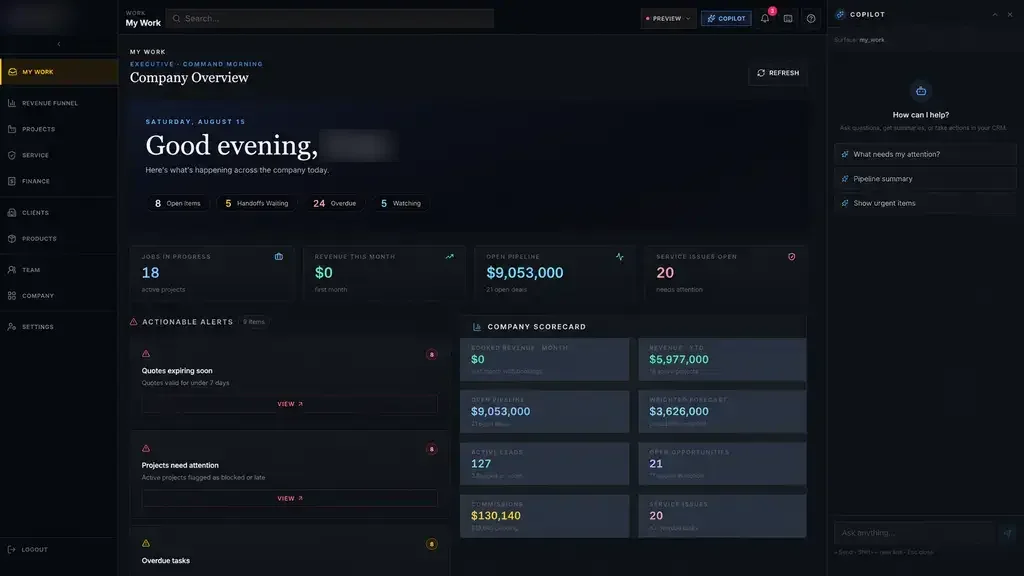
Industrial Operations PlatformIndustrial Operations Platform dashboard with connected work queues and company scorecards Built · Industrial operationsIndustrial Operations PlatformOne accountable digital thread from the first inquiry to engineering, production, installation, billing and service.View the project →

Start with the problem. We'll build the possibility.

Tell us what slows your team down. We'll map it with you and suggest a useful first release, whether you're in Nashville or anywhere in Middle Tennessee.