Nashville, TN
manufacturing software · nashville

Quote-to-Order Software That Turns an Accepted Quote Into a Job Without Retyping

Estimators in Middle Tennessee shops often build quotes in spreadsheets, email them as PDFs and retype the details when the customer says yes. Nashline Software builds quote-to-order software that prices from your real costs, routes approvals and turns an accepted quote into an order and job.

3 min read · 3 sections · 3 answers

Consistent pricing

Same rules for everyone.

Faster quotes

Costs already loaded.

No retyping

Quote becomes the job.

Clear history

Every revision kept.

Sales, estimating and production work from the same numbers.

01

Quotes priced from your costs

Material, labor rates, routings, setup and margins drive the price, so two estimators quote the same part the same way.

  • Material and outside processing
  • Routings and labor rates
  • Quantity breaks
  • Margin rules and approvals
02

Approvals and revisions tracked

Quotes over set limits go to a manager. Revisions keep history, so everyone knows which version the customer accepted.

// how quote-to-order software flows
  1. 1 Request received
  2. 2 Quote priced
  3. 3 Quote sent
  4. 4 Customer accepts
  5. 5 Order and job created
03

Accepted quote becomes the order

When the customer accepts, the quote becomes an order and a job with its routing and materials, ready for scheduling.

TodayWith quote-to-order software

✕Spreadsheet pricing

✓Pricing from real costs

✕PDFs lost in email

✓Quotes tracked to acceptance

✕Retyping into a job sheet

✓Job created from the quote

The system handles

  • Pricing from your rules
  • Reminding sales about open quotes
  • Creating the order and job

Your people decide

  • Final price and margin
  • Engineering review
  • Customer negotiation
your first release

What a first quote-to-order software release includes

A focused starting point, shaped with your team in Discovery and adjusted to how your Nashville team works. Then we build on it.

  1. Discover
  2. Design
  3. Build
  4. Launch
  5. Optimize
Plan your first release →
release planQuote-to-Order Software · v1.0Ready to scope
  • Pricing rules and cost data01
  • Quote builder and approvals02
  • Customer acceptance page03
  • Order and job conversion04
  • Win-rate reporting05
  • Handover runbook and owner register06
Then: connect more tools, add automation and AI as your team is ready.
in practice

What quote-to-order software looks like day to day

Illustrative scenarios, not client stories.

A fabricator in Antioch

Picture quotes built from an old spreadsheet with hidden formulas. Pricing now uses current material costs and the same rules for every estimator.

Build something like this →Every system is shaped around your own process.
faq

Quote-to-Order Software: questions we hear

Still unsure? Ask us directly.

Can customers accept online?

Yes. Customers can review, sign and accept a quote online, with the accepted version locked.

Do we have to replace the software we use now?

Usually not. We connect the tools you keep where their APIs or exports allow, and build only what is missing.

Who owns the software?

You do. The code, the data and the documentation are yours after launch.

built by our team

See the pattern in a real system

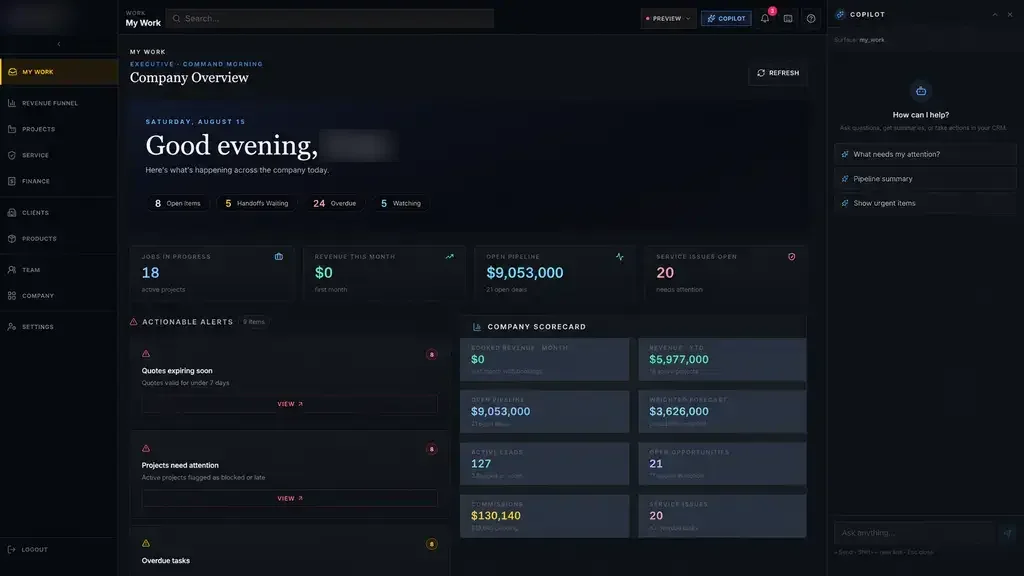
A quote-to-service operating system where every job follows one path, and leaders only step in when a job drifts off course.

All highlighted work →
Industrial Operations PlatformIndustrial Operations Platform dashboard with connected work queues and company scorecards Built · Industrial operationsIndustrial Operations PlatformOne accountable digital thread from the first inquiry to engineering, production, installation, billing and service.View the project →

Start with the problem. We'll build the possibility.

Tell us what slows your team down. We'll map it with you and suggest a useful first release, whether you're in Nashville or anywhere in Middle Tennessee.